Fabric Apps vs Claude Dashboards
I gave Claude the same brief and data as my Claude Dashboards post and asked for a Fabric App instead. From one prompt it built a better report at a fifth of the cost, and every number sits in a semantic model you can check.
Fabric Apps won this round.
Last week I wrote up Claude Dashboards vs Power BI. I gave Claude a challenge dataset and a design brief, it built an eight-tab Claude dashboard, and I checked it against Power BI on 30 capabilities. My conclusion was that Claude Dashboards works best on top of a good semantic model.
So I ran the same test on a platform that starts from one. I gave Claude the same Excel workbook and the same brief, and asked for a Fabric App instead. Fabric Apps are Microsoft’s code-first web apps that run inside Fabric (they’re in preview), and the analytics template reads every number from a Power BI semantic model.
I’m significantly more impressed with what came back. Margin Ledger is a better report than my Claude dashboard, it took one message and about a fifth of the build cost, and every number in it is a DAX measure in a semantic model that anyone with access to the workspace can open and check. Claude built both, with the same model, so this is really about what each platform hands Claude to work with. The comparison isn’t perfectly even, and I’ve set out where it isn’t.
You don’t have to take my word for the report part: there’s a public copy of Margin Ledger on this site that you can click through without signing in.
What I built
The data is the ZoomCharts Power BI Challenge for September 2026 again: an e-commerce profitability workbook with 9,109 order lines across 2024 and 2025. From one prompt, Claude loaded the workbook into a Fabric lakehouse, built a Direct Lake semantic model on it, built Margin Ledger on that model with the Fabric Apps analytics template, and deployed it to my Portfolio workspace.
Margin Ledger has eight pages in the brief’s order (Overview, Products, Returns, Promotions, Customers, Channels & markets, Fulfillment, Inventory) with 36 Vega-Lite charts, under one filter bar for year, region, channel and category. Click a bar or a point and it filters every page; click it again to clear it. The image at the top is its Overview page.
The prompt
Here’s the prompt, word for word, as I did in the first post:
make a dashboard using from the e-commerce Excel file in this directory. this is the design brief, ignore references to ZoomCharts, we won’t be using zoom charts for this challenge. For any questions go with your recommendations. Create a semantic model in this directory and then create a fabric app visualisation. post to my portfolio workspace. [a link to my Portfolio workspace] [the ZoomCharts challenge brief, pasted in full]
Yes, I asked for the semantic model. On this route it isn’t really optional, though: the analytics template reads its data from a semantic model, so the numbers end up in a governed, reusable model by design. The Claude dashboard’s prompt went the other way and told Claude to ignore the Power BI project in the folder.
What each build took
Both builds ran in Claude Code on Claude Opus 5.5, and I worked out each one’s effort from its transcript the same way. The Claude dashboard’s figures are the ones from the first post.
| Claude dashboard | Margin Ledger | |
|---|---|---|
| Messages I typed | 3 | 1 |
| Prompt to done | about 15 hours | 4 hours 17 minutes |
| Agents | 37, in four workflows | 1, no subagents |
| API calls | 4,065 | 472 |
| Tokens processed | about 989 million | about 146 million |
| Cost at API list prices | US$357.62 | US$66.92 |
| What it built | The dashboard | The lakehouse, the semantic model and the app |
| Where the numbers live | JavaScript calcs inside the page | 83 DAX measures in a semantic model |
So Margin Ledger cost about a fifth as much to build, and that one run also built the lakehouse and the semantic model the app reads from. As in the first post, my Claude plan covered both, so these are the honest figures for what each build used rather than what I paid. Most of both totals is cache reads (97% in each), which cost a fraction of fresh input.
Side by side
Here’s the same page from each build, Claude dashboard on the left and Margin Ledger on the right, both on their opening view with no filters.
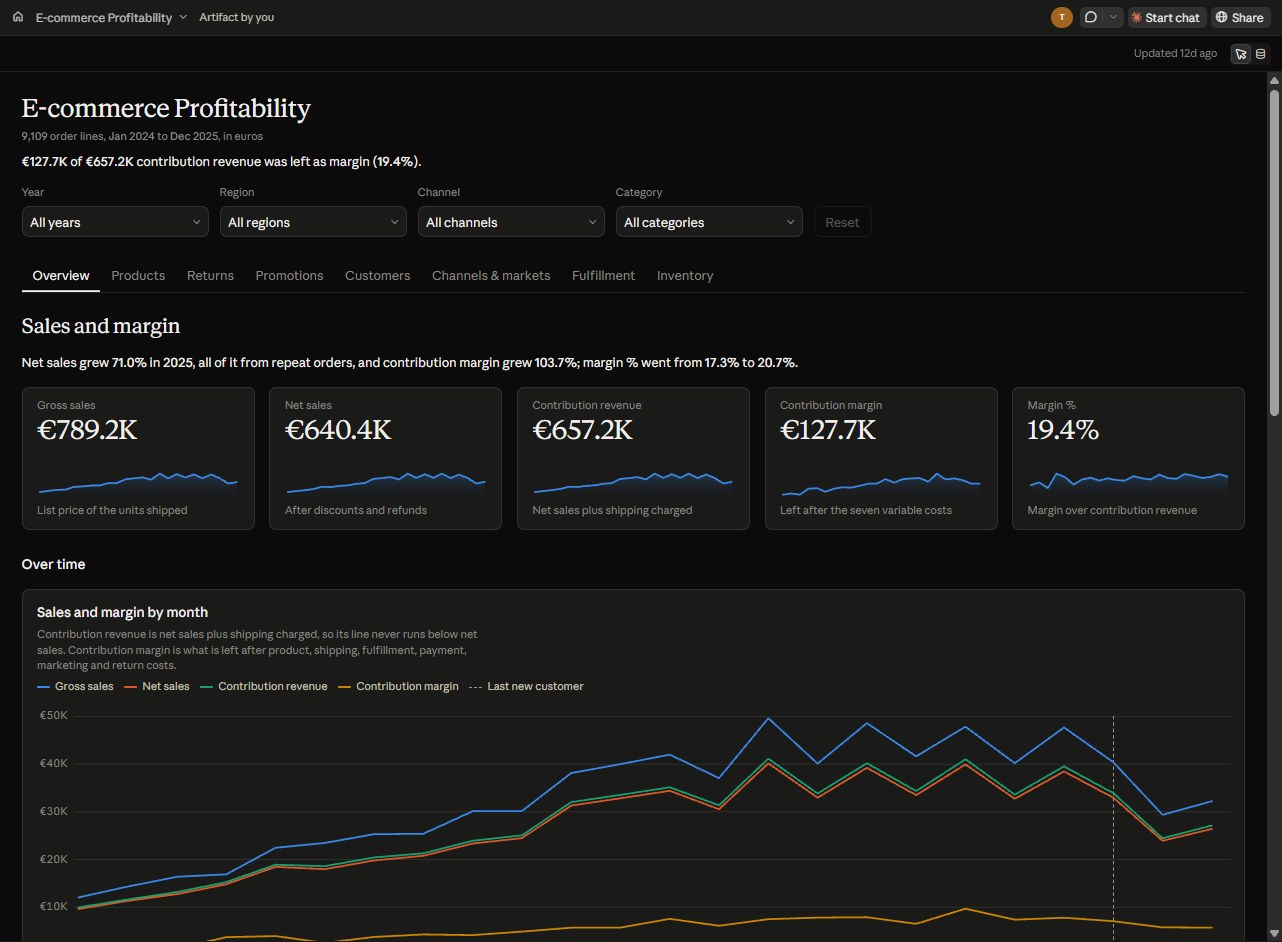
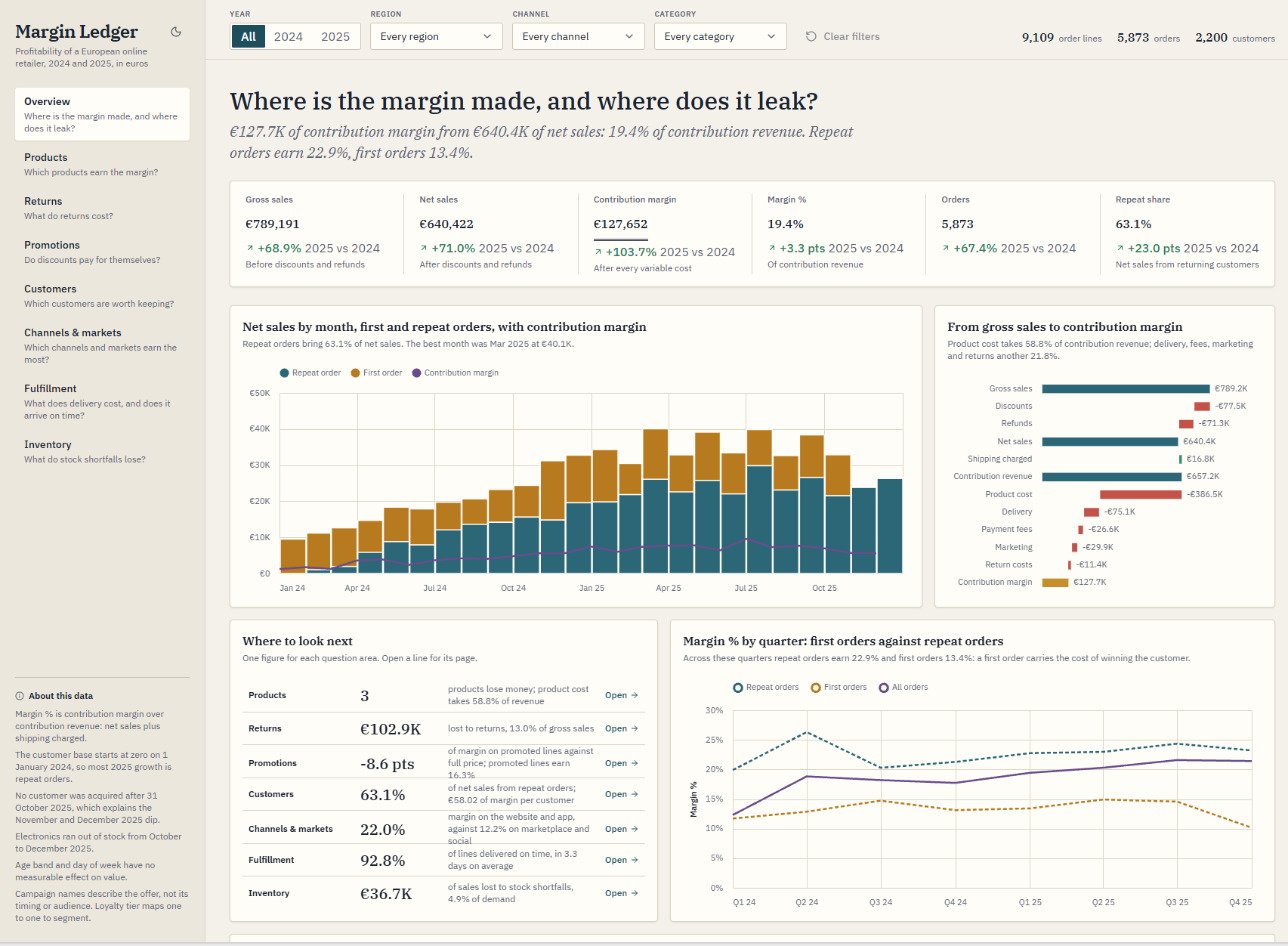
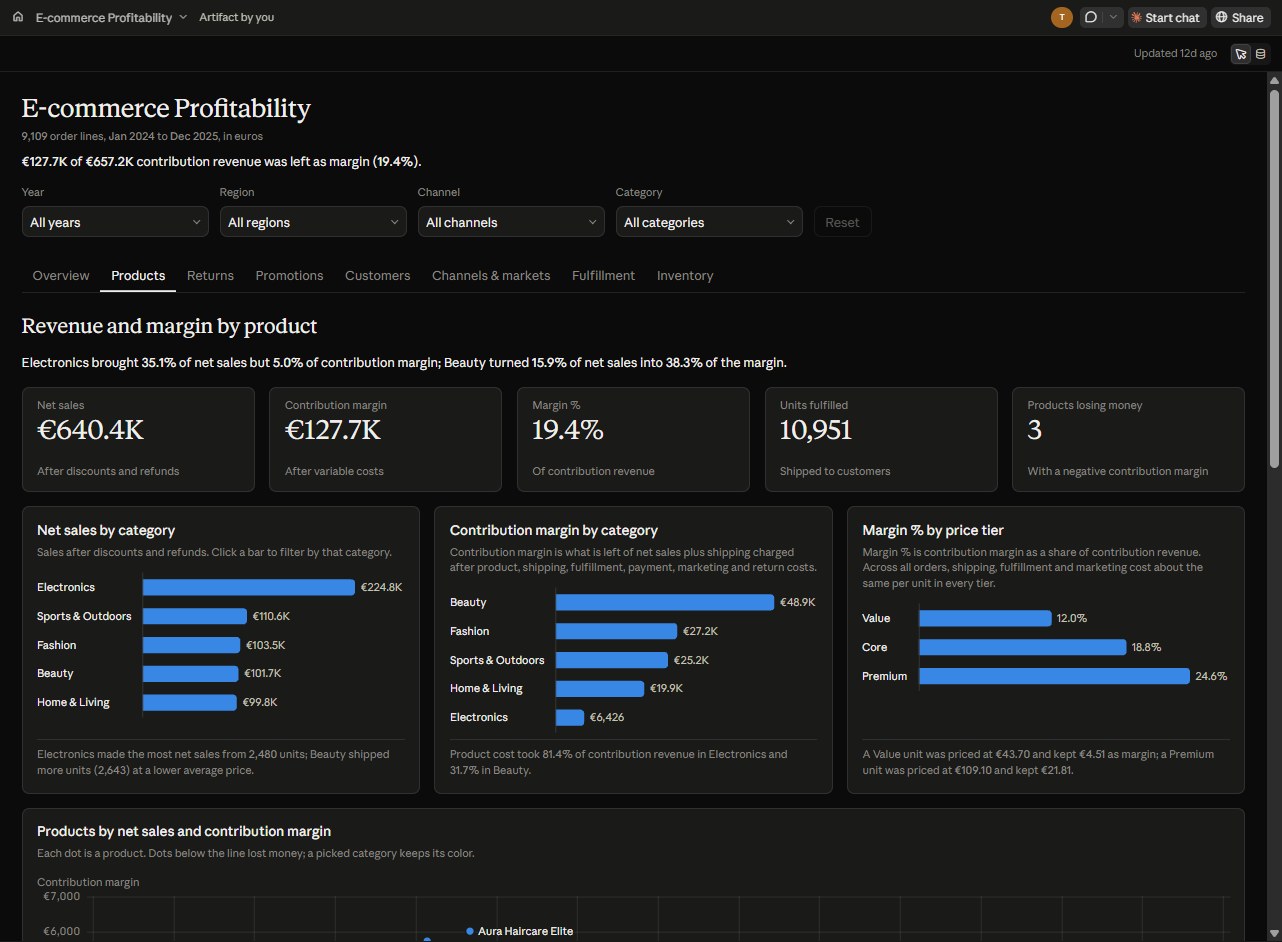
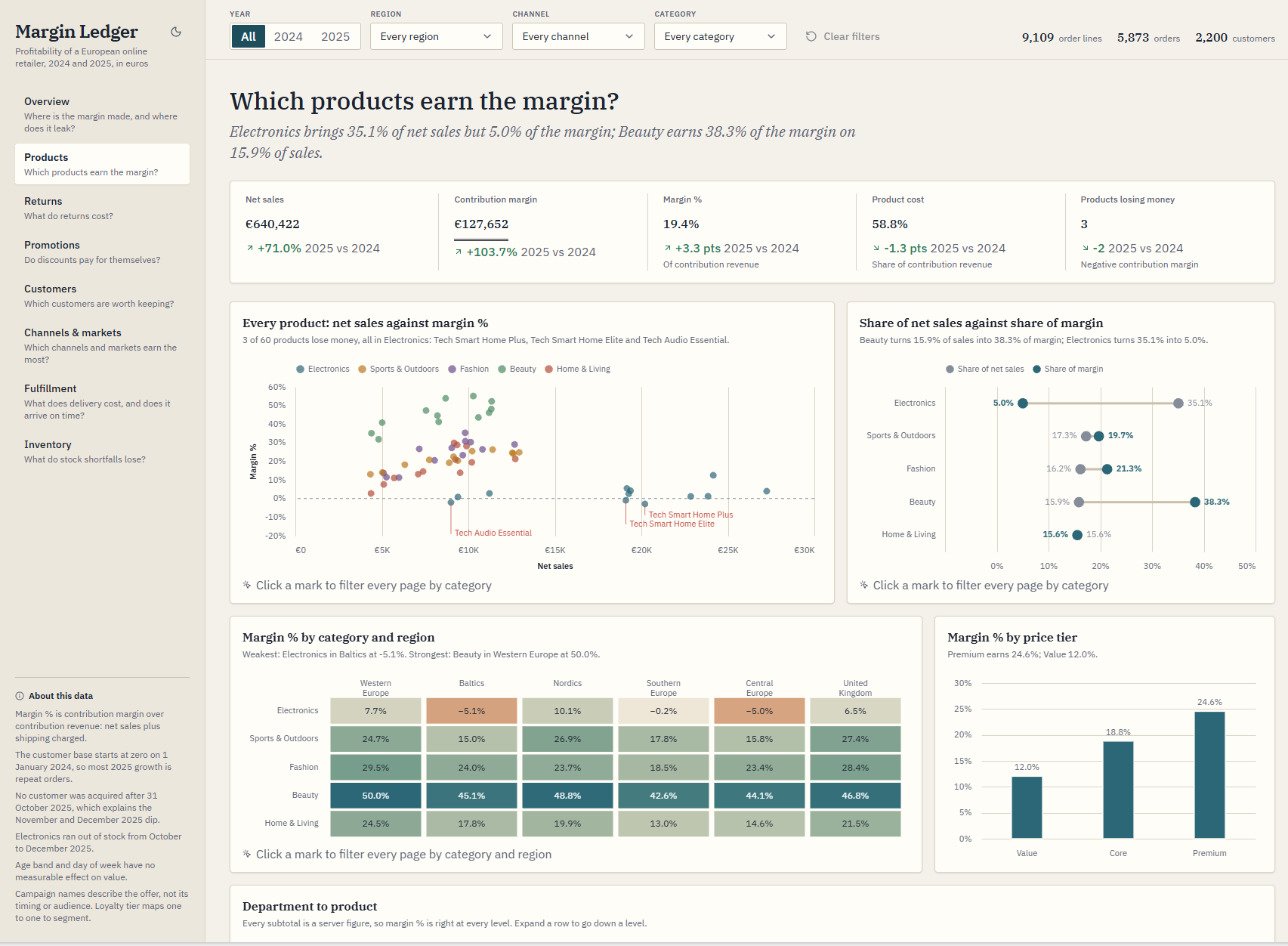
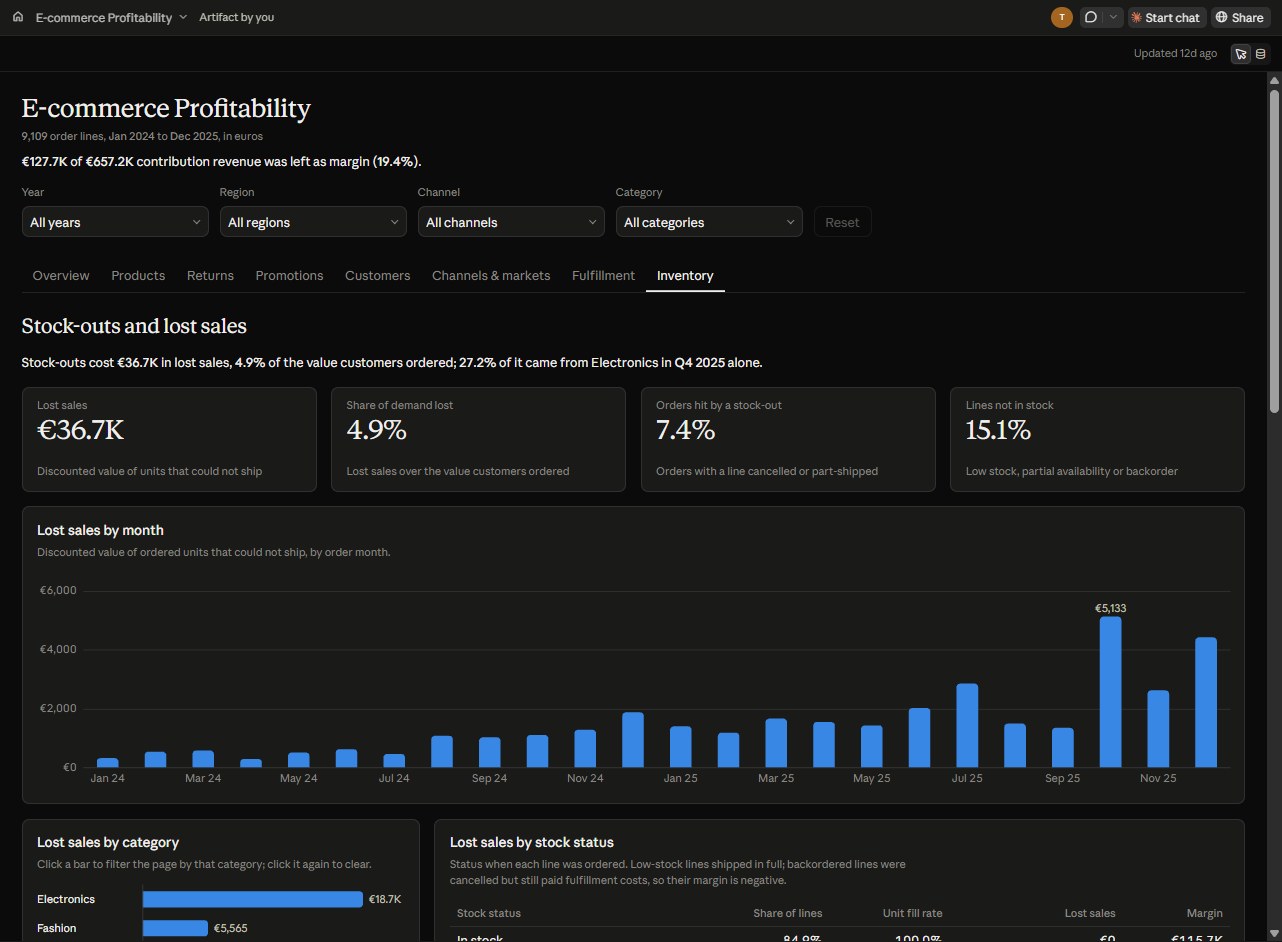
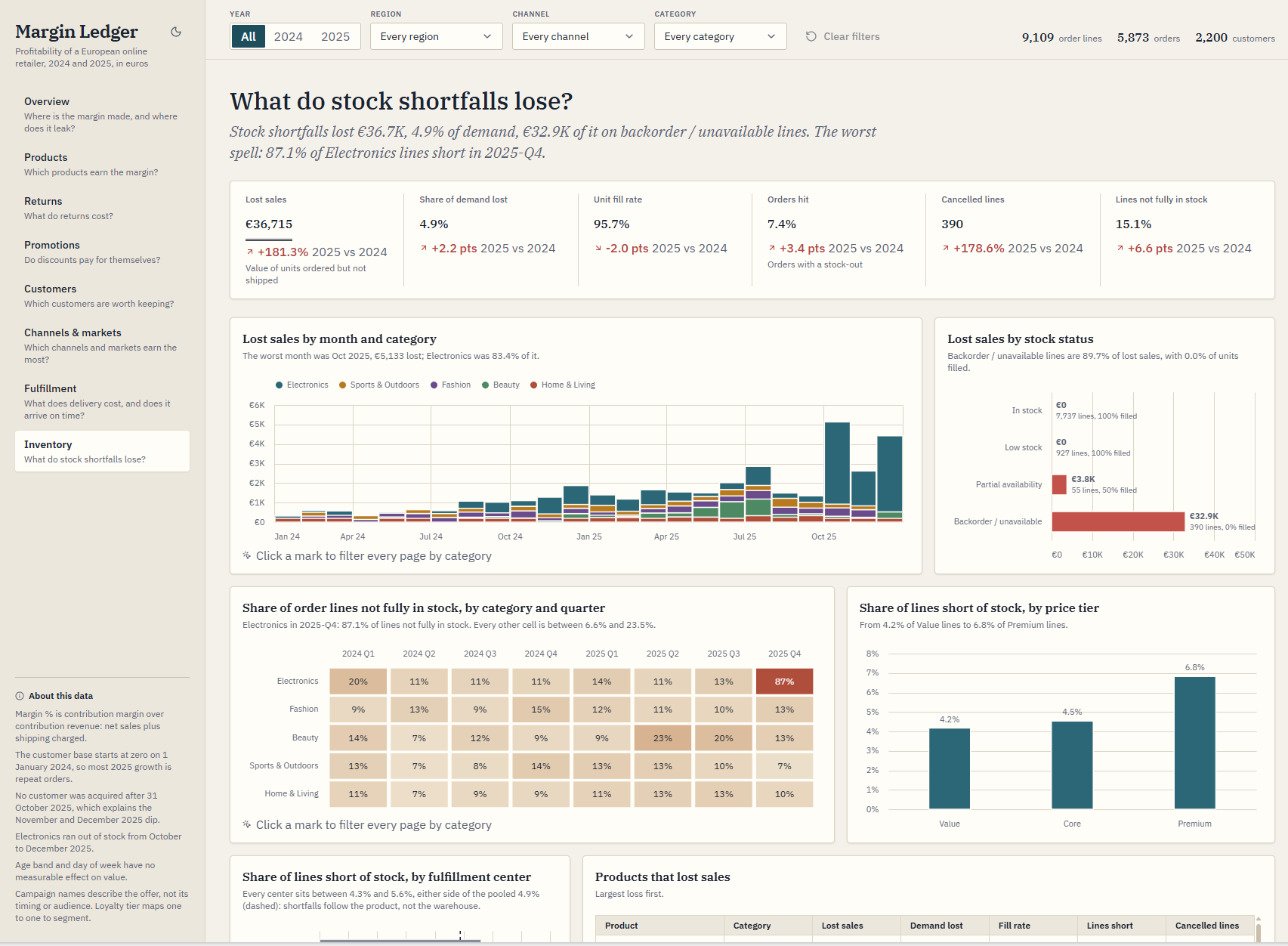
Both builds land on the same headline numbers: €640.4K of net sales, €127.7K of contribution margin and a 19.4% margin. So the gap isn’t whether a number is right. It’s how easy each report is to read, and how easy each number is to check.
Why I find it easier to read
Some of this is taste: I’m not a fan of the Claude dashboard’s dark background and all that blue. Most of it is in the screenshots, though:
- Every page opens on a question. Margin Ledger’s pages are titled “Where is the margin made, and where does it leak?”, “Which products earn the margin?” and “What do stock shortfalls lose?”. The Claude dashboard’s sections are topics: “Sales and margin”, “Revenue and margin by product” and “Stock-outs and lost sales”.
- Every chart says what it found. Each Margin Ledger subtitle is a finding (“The worst month was Oct 2025, €5,133 lost; Electronics was 83.4% of it”). The Claude dashboard’s chart subtitles mostly describe what the chart shows, and some cards add a finding underneath.
- The chart fits the question. A waterfall for where the margin goes, a dumbbell for share of sales against share of margin, stacked bars for which category the lost sales came from, and a heatmap for the one bad quarter. The Claude dashboard leans on bar and line charts.
- Charts are sized to what they show. Margin Ledger lays its charts out in a tidy two-column grid. The Claude dashboard has a lot of very wide charts, and they’re more messily arranged.
An exploratory report is built for the reader to dig into the data. An insight-led report hands the reader the answer without asking them to dig. Doing both at once, an exploratory report that still tells you what it found, is one of the hardest things in data visualisation, and Margin Ledger did it from one prompt. That’s what impressed me.
The numbers live in the model
This is the part I really want to drive home. In the first post, Margin % in the Claude dashboard was one line inside a 148-line JavaScript calc that worked out every metric for every filter combination up front. In Margin Ledger it’s a DAX measure in the Ecommerce Profitability semantic model: Direct Lake on the lakehouse, 10 tables plus a measure table, 12 relationships, and 83 measures in 10 display folders (Sales, Costs, Margin, Volume, Returns, Fulfillment, Inventory, Promotions, Customers and Time comparison).
Every chart in the app is a DAX query against those measures. So anyone with access to the workspace can open the model, read a measure, run it in DAX query view and check it against the number on screen, and a Power BI report or another app can reuse the same measures instead of rebuilding them. The model’s totals also match my pandas check of the workbook to the cent: net sales €640,421.57 and contribution margin €127,651.90.
Margin % and the two measures it uses, as Claude wrote them in the model
/// Net sales plus shipping revenue: the revenue every variable cost is taken from.
measure 'Contribution Revenue' = SUM ( 'Order Lines'[Contribution Revenue] )

/// What is left of contribution revenue after product, shipping, fulfillment, payment, marketing and return costs.
measure 'Contribution Margin' = SUM ( 'Order Lines'[Contribution Margin] )

/// Contribution margin divided by contribution revenue: the model's headline margin.
measure 'Margin %' =
    // share of contribution revenue kept as contribution margin
    VAR __Result =
        DIVIDE (
            [Contribution Margin],
            [Contribution Revenue]
        )
    RETURN
        __Result
That’s the first post’s conclusion seen from the other side. A Claude dashboard works best on a good semantic model; a Fabric App built from the analytics template can’t work without one.
Where it isn’t even
I don’t want to oversell this, so here’s where the comparison isn’t a fair fight:
- The prompts differed. The Fabric build was told to create a semantic model; the Claude dashboard build was told to ignore the Power BI project in the same folder.
- The Fabric build had more help. It ran on my own Fabric App skills, distilled from three earlier apps, plus the analytics template’s own agent skills. Part of the gap is my tooling, not the platform.
- They spent their effort differently. A big share of the Claude dashboard’s cost went on checking: eight adversarial reviewers, and more than 10,000 numbers matched back to the data. Margin Ledger’s single agent had no review workflow of that size.
- One dataset, one brief, one run each. That’s a test, not a benchmark.
A Claude dashboard pointed at the same semantic model would close the checking gap, since its numbers would be the model’s measures. It wouldn’t change the report itself or the build cost, and today a live connection from Claude Dashboards to a Fabric semantic model still means hosting your own remote MCP server (more on that in the first post).
What it costs to run
This is where Claude Dashboards has the easier story. Fabric Apps is in preview, needs a tenant admin to turn on the Fabric apps setting, and runs in a workspace on a Fabric capacity (Microsoft’s quickstart). Microsoft’s docs don’t name a minimum capacity size, and I haven’t run Margin Ledger on anything smaller than the trial.
Margin Ledger runs on a free Fabric trial. After that, the smallest Fabric capacity, an F2, is about A$426 a month pay as you go (about A$14 for each day it runs, and you can pause it), or about A$254 a month reserved for a year (Fabric pricing). A Claude dashboard has no separate charge: it counts toward your Claude plan’s usage.
Readers of this post can’t open my tenant at all, which is why the public copy exists. It’s the same app built a second way: the query hook reads one file of results captured from the semantic model instead of calling Fabric, and the sign-in is gone. It’s a handful of static files on this site, so it costs nothing extra to host.
So which would I use?
For this build, the Fabric App won: a better report, a fifth of the build cost, and numbers that live in a model anyone with access can check and reuse. If I already had a Fabric capacity, it’s where I’d start for anything that needs to last.
Claude Dashboards still has its place. It needs no capacity, it suits a quick exploratory question, and its Sources pane shows the reader the working behind any number. But the first post’s conclusion holds even more strongly now: a dashboard is better on a good semantic model, whoever builds it. With Fabric Apps, you get one by design.
Changelog
- 23 Oct 2026: published.
Feedback, or a correction?
If something here could be clearer, more accurate or done a better way, I’d like to hear it.