Claude Usage Widget: your limits at a glance
A tray icon and a small desktop panel that show how much of your Claude plan you’ve used: the 5-hour session, the weekly limits and when each one resets. The same numbers as Settings > Usage in the Claude app, without opening it.
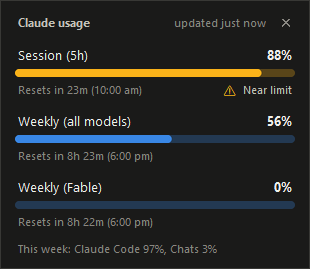
What it shows
Your session % on a coloured square: blue, amber from 75%, red from 90%, grey when the numbers are stale.
Each limit as a bar with its reset time, plus how the week splits between Claude Code and chats.
Hover the icon for both limits and their reset times, no click needed.
One tick in the tray menu and it’s there every morning. Untick it and it’s gone.
Install it
You need Windows, Python 3.10 or later, and Claude Code logged in on a Pro or Max plan. Then four commands:
- Windows 11 puts new tray icons in the overflow (^): drag it onto the taskbar to keep it in view.
- Left-click the icon to show or hide the panel. Right-click either one for Refresh, Keep on top and Quit.
- A second launch exits straight away, so you only ever get one icon.
How it gets the numbers
Claude Code’s own /usage command calls an Anthropic endpoint with the login token Claude Code already keeps on your PC. The widget reads that same token and calls the same endpoint every 3 minutes, so there’s no new login, nothing to paste in, and the token only ever goes to Anthropic.
It never refreshes the token, because a refresh rotates it and would log Claude Code out. When it expires the panel says so, and running Claude Code once fixes it. The endpoint isn’t documented and may change: if the reply stops making sense, the panel says so and keeps the last good numbers.
Why I built it, with Claude Code
I stopped using the Claude Code extension in VS Code, and its usage meter went with it. Checking my limits meant opening the Claude app and clicking through to Settings > Usage every time, so I asked Claude Code for something I could just glance at.
There are open source tray apps that already do this, but each one would hold my Claude login, and I wasn’t handing that to someone else’s code. The Windows 11 Widgets board needs a packaged app, which was too heavy for this, and Claude Code’s statusline only shows in the terminal. So it’s about 700 lines of Python with 33 tests, and Claude Code built it in a day.
Licence and small print
MIT, so use it, change it and share it. Not affiliated with or endorsed by Anthropic. It runs on Windows only, needs Claude Code logged in on a Pro or Max plan, and relies on an undocumented endpoint, so a change on Anthropic’s side can break it.